How p5.penplotter works
How a supported p5 shape becomes recorded geometry for the pen.
Recording geometry
Each supported shape call has two outputs: a p5 drawing on the canvas and geometry in the core engine. The adapter converts canvas pixels to millimetres using an offset and scale. It converts a circle's diameter to a radius; a point becomes a 0.24 mm dash. Core fills are converted back to pixels for display.
The recording contains the shapes added since the last plot.clear(). Clear replaces the geometry engine, while keeping the driver and open connection. Planning takes a snapshot of that recording; later changes to the canvas do not add strokes to an active job.
Paper and coordinates
Paper dimensions come from PlotterEngine.paperSize(). The adapter resolves the sheet's orientation and position, then calculates the drawing's scale and offset. After connecting, automatic paper placement is recalculated against the selected driver's configured bed; recorded geometry moves with the paper without changing scale, while explicit paperX, paperY, x and y remain unchanged. plan() checks the recorded strokes against the selected paper margins before connecting. The driver checks machine travel separately.
A bed preview displays the resolved sheet and plan. It does not change either. Paper placement does not establish a machine origin or reverse motor directions. See Setup for the physical origin and Guide for placement examples.
Jobs and the driver
The adapter supplies a complete PlotPlan to the core's driver. The driver compiles its movements into motor and pen commands and sends them through Web Serial. For the iDraw profile, EBB means EiBotBoard, the controller connected over USB.
plot.sequence() clears the recording, asks your function to draw one object, plots it and waits for physical idle before asking for the next. The driver keeps its position and motor steps between objects. After the last object it returns home and releases the motors. The Guide shows how to use it.
The underlying driver session was tested on 2026-10-03 with three successive lines on the iDraw HSE / A2 and EBB 3.0.2, followed by one return home. Stop and fault cases were tested with simulated connections only. Adding geometry while the machine draws remains unimplemented.
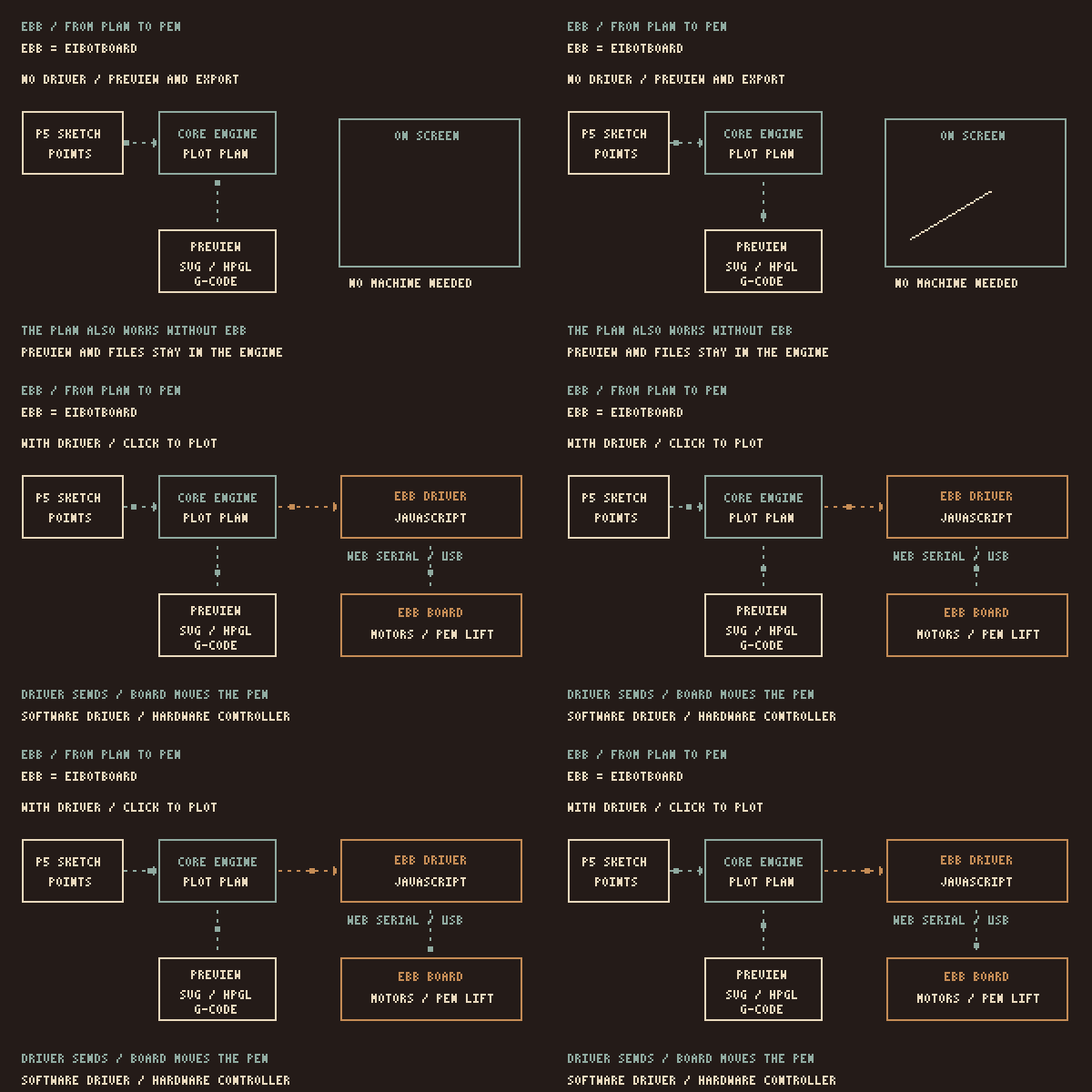
Choosing the connection
When you connect, vanilla.penplotter reads the controller response and selects EBB or DrawCore. The p5 adapter passes the drawing plan to that driver. It still needs the machine bounds, pen heights and axis directions; a controller response does not identify the whole plotter.
For DrawCore, supply these in the drawcore options of createPlot(). They also set the bed used for paper placement. paper: "A3" selects the sheet. The Setup page uses the settings from the small A3 H hardware test.
DrawCore waits for physical idle before finishing a drawing. Normal Stop waits for accepted motion, raises the pen and confirms Idle; the latest pen lift on stop has not been physically confirmed yet. Errors and emergencyStop request feed-hold; penlift is not guaranteed. Plot commands use commandTimeoutMs (default 120000 ms), while identity and status queries keep short timeouts. Object-by-object sessions remain available through the EBB driver.
Recording limits
The adapter records shape arguments, without reading p5's drawing state. translate(), rotate() and scale() do not transform recorded geometry. Rectangles use corner coordinates; ellipses use centre coordinates, regardless of screen modes. Colours, stroke weight and ordinary p5 fills stay on screen.
Text, general Bézier curves and arbitrary p5 sketches are not captured. For transformed shapes, calculate the coordinates before passing them to the plot. The Guide lists the available calls.
Library boundaries
p5.penplotter installs helpers on the p5 prototype and owns the canvas-to-millimetre mapping. vanilla.penplotter owns geometry, SVG import, cleanup, route planning, file exports, machine profiles and drivers. See the core architecture for those parts.
Installation checks the minimum dependencies; it does not verify every version combination. Setup supplies the release bundle. The module load order is described below.
Library development
Local neighbours
While working on the libraries themselves, load them from sibling folders instead of GitHub Pages. Use these imports for source-level integration. The published examples use the release bundle:
import { PlotterEngine } from "../vanilla.penplotter/vanilla.penplotter.js";
import * as Ebb from "../vanilla.penplotter/src/driver/ebb.js";
import { installP5Penplotter } from "../p5.penplotter/p5.penplotter.js";
Relative imports resolve against the importing file. vanilla.penplotter.js re-exports from its own src/ folder, so the whole repository has to be present, not the single file.
Module load order
p5.penplotter and vanilla.penplotter are ES modules: files that use import and export. A module has two properties that decide these setups.
- A module creates no globals. A
function setup()written inside a module is invisible to p5, because p5's global mode looks forwindow.setup.
- A module script is deferred. The browser runs it after the whole page has been read, but before the
loadevent fires.
p5 starts a global-mode sketch on load. For the editor setup, the load order is:
1. p5.js loads                          (classic script, runs at once)
2. classic scripts run in order         (your sketch.js defines setup/draw)
3. page fully read
4. module scripts run                   (the adapter is installed here)
5. DOMContentLoaded
6. load  →  p5 calls window.setup()     (createPlot already exists)
Keep the imports in a module and the global sketch in a normal script.